
eSocial outages and problems
User reports, last 24 hours
519 reports in total, counted in 15-minute windows
In the last hour, 40 problem reports came in for eSocial, and at this time of day there are usually almost none. Over the last 24 hours there were 519 reports. Most recent reports were about website (40%) and login (31%). The last spike in reports was 16 min ago and lasted 3 h. These are user reports from Brazil, where most people report eSocial problems.
- NormalClose to the usual level18 h 15 min · 203 reports
- ElevatedMore than 1.5 times the usual level2 h 45 min · 124 reports
- OutageMore than twice the usual level and far above the day's average3 h · 192 reports
- Usual levelWhat a usual day sees at that timeAlmost none at this time of day
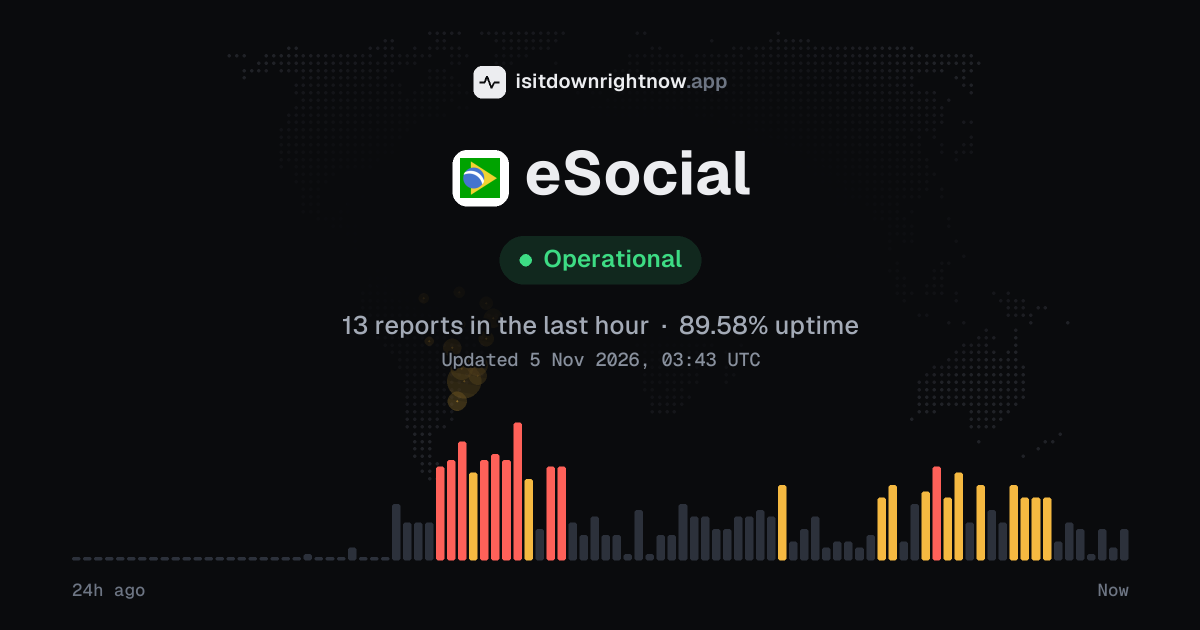
In the past 24 hours, 519 user reports came in for eSocial. Counting only the 15-minute windows with a spike big enough to count as an outage, that comes to 87.50% uptime for the day.
The most recent spike big enough to count as an outage was 3 hours ago. The busiest 15-minute window of the day had 19 reports, about 14 hours ago.
-
Outage
Ended 15 min agoLasted 3 h14peak reports
-
Outage
Ended 4 h agoLasted 15 min14peak reports
-
Elevated reports
Ended 6 h agoLasted 15 min12peak reports
-
Elevated reports
Ended 8 h agoLasted 15 min11peak reports
-
Outage
Ended 11 h agoLasted 3 h19peak reports
eSocial in November 2026
- Problem reports in November (since 3 November)
- 528
Monthly report for November 2026
What went wrong
What people said was wrong in recent problem reports for eSocial.
Share of 58 recent reports that said what was wrong.
eSocial problem spikes, last 30 days
Since 3 November, eSocial had 5 outage spikes and 1 period of elevated reports. The longest lasted 3 h, on 4 November.
-
Outage
Wed 4 Nov, 23:48–02:48Lasted 3 h16peak reports
-
Outage
Wed 4 Nov, 23:03–23:18Lasted 15 min16peak reports
-
Outage
Wed 4 Nov, 20:33–20:48Lasted 15 min13peak reports
-
Outage
Wed 4 Nov, 18:33–18:48Lasted 15 min12peak reports
-
Outage
Wed 4 Nov, 13:03–16:03Lasted 3 h23peak reports
-
Elevated reports
Wed 4 Nov, 12:01–12:16Lasted 15 min10peak reports
A spike is a sharp rise in problem reports from users, kept exactly as this page showed it at the time. This history starts on 3 November 2026. Monthly reports for all services
How to fix eSocial not working
When eSocial itself is having trouble, these steps won't bring it back, but they will rule out anything on your side:
Your browser tries to reach esocial.gov.br over your own connection, right now. Nothing is sent to us or stored.
Restart the gov.br sign-in
Close every tab opened from the portal, then reopen esocial.gov.br and sign in through gov.br again. If the page loops back to CPF and password, open a private window with Chrome: menu > New Incognito window, or Edge: Settings and more > New InPrivate window.
Clear eSocial site data
A stale gov.br cookie can leave the eSocial screen blank after login. In Chrome, go to Settings > Privacy and security > Third-party cookies > See all site data and permissions, search for gov.br and esocial.gov.br, then delete the shown data.
Allow portal pop-ups
The portal can open forms and receipts in a new tab. In Chrome, open Settings > Privacy and security > Site settings > Pop-ups and redirects, then add [*.]gov.br and [*.]esocial.gov.br under Allowed to send pop-ups and use redirects.
Check your certificate
Company access can fail on one computer when Windows cannot see the digital certificate. Press Windows + R, type certmgr.msc, open Personal > Certificates, and check for the CPF or CNPJ certificate you use with gov.br. If it is missing, reconnect the token or smart card before opening the browser again.
While eSocial is down: what to use instead
- Payroll software queue Save the generated events in your payroll system and resend the batch when the government environment accepts submissions again.
- eSocial Web modules If your payroll integration is the only part failing, try the web module for your employer type to consult data or make a small manual entry.
- Gov.br account If the problem stops at login, sign in to Gov.br separately and fix password or account access before trying the portal again.
- Receita Federal e-CAC If you only need to review DCTFWeb or tax payment information from events already accepted, use e-CAC while the service recovers.
Problems at the same time as eSocial
Since 3 November, all 6 of eSocial's spikes in problem reports overlapped a spike at another service.
When several services get problem reports at once, something they share, such as a cloud host or a network, can be the real cause. Matching times alone do not prove it.
Most often at the same time
How many of eSocial's spikes overlapped one of theirs.
During the latest spike
eSocial: Wed 4 Nov, 23:48 to 5 Nov 02:48
- Sainsbury’s, outage,07:33 to 5 Nov 00:03, 5 Nov 00:39 to 5 Nov 00:57
- GOV.BR, outage,10:18 to 5 Nov 02:18, 5 Nov 02:42 to 5 Nov 02:57
- USPS, outage,10:48 to 5 Nov 02:03
- Facebook, outage,13:47 to 5 Nov 03:02
- Deutsche Glasfaser, outage,14:03 to 5 Nov 00:48, 5 Nov 01:18 to 5 Nov 02:03
- Sam's Club, outage,15:18 to 5 Nov 02:33
- Capital One, outage,16:48 to 5 Nov 03:03
- X (Twitter), outage,18:03 to 5 Nov 00:03, 5 Nov 00:33 to 5 Nov 00:48
147 more services. Red dot: outage. Amber dot: elevated reports.
A spike is a sharp rise in problem reports from users, as the live pages showed it. Times are Central European time.
When people report eSocial problems
The busiest hour for reports about eSocial is 23:00 to 00:00 Central European time, and the busiest day is Wednesday.
By hour of the day
- 00:00 to 01:00: 0.18 reports on an average day
- 01:00 to 02:00: 0.07 reports on an average day
- 02:00 to 03:00: 0.1 reports on an average day
- 03:00 to 04:00: 0 reports on an average day
- 04:00 to 05:00: 0.04 reports on an average day
- 05:00 to 06:00: 0 reports on an average day
- 06:00 to 07:00: 0 reports on an average day
- 07:00 to 08:00: 0 reports on an average day
- 08:00 to 09:00: 0 reports on an average day
- 09:00 to 10:00: 0.02 reports on an average day
- 10:00 to 11:00: 0.04 reports on an average day
- 11:00 to 12:00: 0.13 reports on an average day
- 12:00 to 13:00: 0.73 reports on an average day
- 13:00 to 14:00: 0.37 reports on an average day
- 14:00 to 15:00: 0 reports on an average day
- 15:00 to 16:00: 0 reports on an average day
- 16:00 to 17:00: 0.52 reports on an average day
- 17:00 to 18:00: 0.5 reports on an average day
- 18:00 to 19:00: 0.54 reports on an average day
- 19:00 to 20:00: 0.79 reports on an average day
- 20:00 to 21:00: 0.8 reports on an average day
- 21:00 to 22:00: 0.59 reports on an average day
- 22:00 to 23:00: 0.43 reports on an average day
- 23:00 to 00:00: 0.82 reports on an average day
By day of the week
- Monday: 0 reports on an average Monday
- Tuesday: 0.09 reports on an average Tuesday
- Wednesday: 50 reports on an average Wednesday
- Thursday: 0 reports on an average Thursday
- Friday: 0 reports on an average Friday
- Saturday: 0 reports on an average Saturday
- Sunday: 0 reports on an average Sunday
Each bar is the average number of user reports in that hour, or on that day of the week, from 28 days of reports since 5 October 2026. The busiest bar is highlighted. Spikes in reports are left out, so one outage does not set the pattern.
What happens when eSocial goes down
eSocial is the Brazilian federal government system at esocial.gov.br for sending labor, tax, and social security information about workers. Companies, public bodies, accountants, and domestic employers rely on it, so an outage can stop payroll event filing, admission and termination notices, and routine employer portal work.
Sign-in is often the first pain point: the gov.br handoff may loop, reject a valid session, or leave the portal loading after you choose a profile. If the portal opens, event submission can still fail because receipts do not return, batches stay pending, or forms for employee records and payroll data do not save. Some incidents affect only part of the service, such as the web portal while system integrations keep sending, or one employer profile while another still loads. Regional routing can make the same problem look uneven, with one office blocked and another able to file.
eSocial IP address, servers and network
- IPv4 address
- 161.148.164.31
- IPv6
- 2804:151:3:2:161:148:164:31
- Network
- AS10954 · SERVICO FEDERAL DE PROCESSAMENTO DE DADOS - SERPRO, registered in BR
- DNS hosted by
- its own name servers (gov.br)
- HTTPS certificate
- Issued by Sectigo Limited, valid until 30 Jan 2027 (85 days)
- HTTP/3
- Not advertised
- Our check
- Answered in 1,812 ms
Checked from our server in Frankfurt, Germany, less than an hour ago, for www.gov.br. Visitors elsewhere may see different addresses.
eSocial FAQ
Is eSocial down right now?
Why can I sign in to gov.br but still cannot enter eSocial?
Why is the eSocial Doméstico payroll page not generating the DAE?
Why does sending an event fail or stay pending in eSocial?
Can I use eSocial on my phone, or does it need a computer?
Contact eSocial support
Tip: eSocial doesn't list a public status page that we know of, so its help centre and the report chart on this page are the best places to check.
Put the eSocial status badge on your site
Paste one of these into a web page, a blog post or a README. The badge shows the same status as this page, based on user problem reports. Browsers can keep a copy for up to 4 hours. It links back here.

<a href="https://isitdownrightnow.app/services/esocial/"><img src="https://isitdownrightnow.app/badge/esocial.svg" alt="eSocial status" height="20"></a>[](https://isitdownrightnow.app/services/esocial/)The badge is a plain image: no scripts, no cookies. People who see it on your page load it from our server.
How we track eSocial
The status on this page comes from user-submitted problem reports for eSocial, counted in 15-minute windows over the last 24 hours. Each window is compared with the normal level for eSocial, so a few complaints on a quiet day don't trigger anything, but a sudden jump well above normal does.
When reports climb well above normal, the status here changes to partial outage or major outage and the chart moves with it. eSocial doesn't publish a public status page that we know of, so user reports are often the quickest sign that something is wrong on their side.