
BT outages and problems
User reports, last 24 hours
2,181 reports in total, counted in 15-minute windows
In the last hour, 39 problem reports came in for BT, against about 45 at this time on a usual day. Over the last 24 hours there were 2,181 reports. Most recent reports were about broadband (80%) and E-mail (12%). The last spike in reports was 2 h ago and lasted 1 h 36 min. These are user reports from the UK, where most people report BT problems.
- NormalClose to the usual level22 h · 1,842 reports
- ElevatedMore than 1.5 times the usual level2 h · 339 reports
- OutageMore than twice the usual level and far above the day's averageNone in this chart
- Usual levelWhat a usual day sees at that timeAbout 45 an hour now
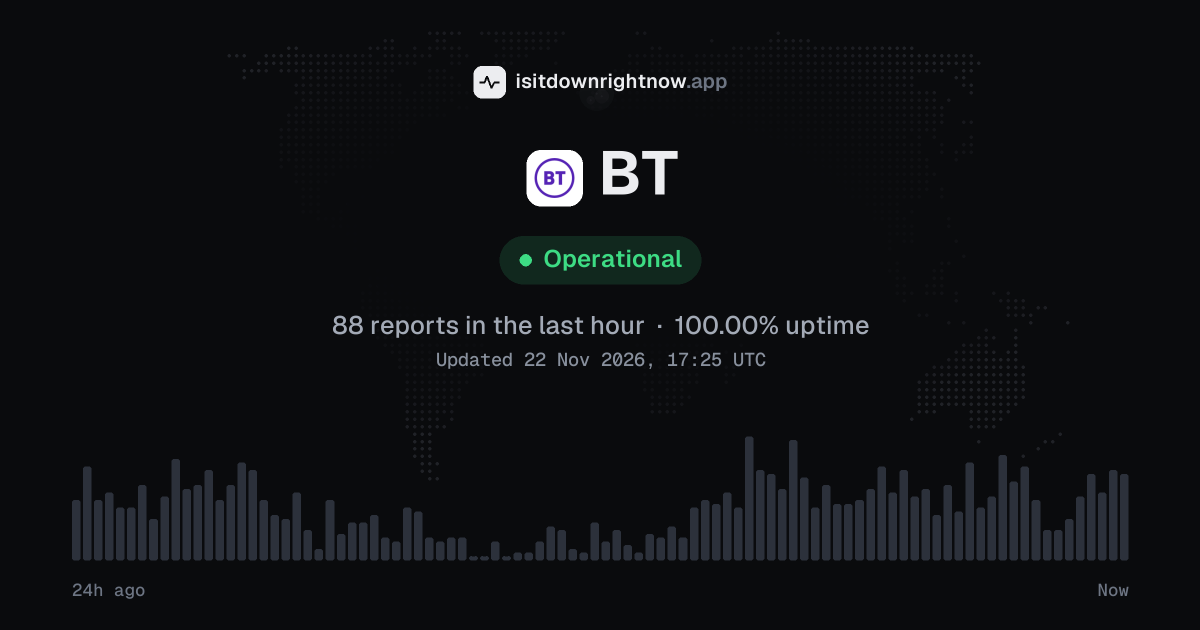
In the past 24 hours, 2,181 user reports came in for BT. Counting only the 15-minute windows with a spike big enough to count as an outage, that comes to 100.00% uptime for the day.
The busiest 15-minute window had 52 reports, about 11 hours ago. That stays below our outage threshold, so it doesn't count as downtime.
-
Elevated reports
Ended 2 h agoLasted 15 min26peak reports
-
Elevated reports
Ended 3 h agoLasted 15 min28peak reports
-
Elevated reports
Ended 5 h agoLasted 45 min50peak reports
-
Elevated reports
Ended 6 h agoLasted 15 min45peak reports
-
Elevated reports
Ended 10 h agoLasted 15 min44peak reports
BT in November 2026
- Problem reports in November
- 43,134
- Outage spikes
- 11
- Periods of elevated reports
- 67
Monthly report for November 2026
What went wrong
What people said was wrong in recent problem reports for BT.
Share of 554 recent reports that said what was wrong.
Where BT problem reports come from
The map shows where recent problem reports for BT came from in the UK. Big cities always send the most, so dots in many places point to a widespread problem, and one area far ahead of the rest can mean a regional one.
- Outage now
- Problems now
- Normal
Map outlines: Natural Earth.
BT problem spikes, last 30 days
Since 27 October, BT had 12 outage spikes and 83 periods of elevated reports. The longest lasted 16 h 37 min, on 13 November.
- Sun 18 Oct: no data
- Mon 19 Oct: no data
- Tue 20 Oct: no data
- Wed 21 Oct: no data
- Thu 22 Oct: no data
- Fri 23 Oct: no data
- Sat 24 Oct: no data
- Sun 25 Oct: no data
- Mon 26 Oct: no data
- Tue 27 Oct: 3 reports
- Wed 28 Oct: 16 reports (elevated reports that day)
- Thu 29 Oct: 1,626 reports (outage spike that day)
- Fri 30 Oct: 1,737 reports (elevated reports that day)
- Sat 31 Oct: 1,199 reports (elevated reports that day)
- Sun 1 Nov: 1,137 reports
- Mon 2 Nov: 1,738 reports (elevated reports that day)
- Tue 3 Nov: 2,733 reports (outage spike that day)
- Wed 4 Nov: 3,042 reports (outage spike that day)
- Thu 5 Nov: 5,227 reports (outage spike that day)
- Fri 6 Nov: 2,224 reports (outage spike that day)
- Sat 7 Nov: 1,806 reports (outage spike that day)
- Sun 8 Nov: 1,254 reports
- Mon 9 Nov: 7,480 reports (outage spike that day)
- Tue 10 Nov: 3,060 reports (outage spike that day)
- Wed 11 Nov: 1,895 reports (elevated reports that day)
- Thu 12 Nov: 1,881 reports (elevated reports that day)
- Fri 13 Nov: 4,354 reports (outage spike that day)
- Sat 14 Nov: 2,983 reports (outage spike that day)
- Sun 15 Nov: 2,257 reports (outage spike that day)
- Mon 16 Nov: 63 reports
-
Elevated reports
Sun 15 Nov, 22:23–23:59Lasted 1 h 36 min38peak reports
-
Outage
Sun 15 Nov, 20:29–21:14Lasted 45 min57peak reports
-
Elevated reports
Sun 15 Nov, 19:08–19:29Lasted 21 min45peak reports
-
Elevated reports
Sun 15 Nov, 15:55–16:17Lasted 22 min45peak reports
-
Elevated reports
Sun 15 Nov, 14:14–14:29Lasted 15 min54peak reports
-
Elevated reports
Sun 15 Nov, 01:14–02:23Lasted 1 h 9 min24peak reports
-
Elevated reports
Sat 14 Nov, 21:28–00:19Lasted 2 h 51 min41peak reports
-
Outage
Sat 14 Nov, 13:28–20:43Lasted 7 h 15 min71peak reports
87 earlier spikes in this period.
By country
In the last 18 days, most BT problem reports came from the UK (34,749) and the US (260). The UK had the most days at outage level: 5 of 18. The latest outage spike was on Friday 13 November, in the UK.
- The UK5 outage days · 4 elevated34,749
- The USNo spikes260
- Outage spike
- Elevated reports
- Normal
- No data yet
Each square is one day. It turns red when reports stayed at outage level for half an hour or more, and amber when they stayed above the usual level for an hour or more. The number on the right is the country's total since 30 October 2026, when country history starts. A wider gap marks a Monday. Point at a square, or tap it, for that day's numbers. Days run from midnight to midnight, Central European time.
A spike is a sharp rise in problem reports from users, kept exactly as this page showed it at the time. This history starts on 27 October 2026. Monthly reports for all services
How to fix BT not working
BT is up on our end, so if it won't work for you, the problem is most likely on your side. Work through these in order:
Your browser tries to reach bt.com over your own connection, right now. Nothing is sent to us or stored.
Check BT's fault page
The report level at the top of this page compares user problem reports with the usual level in 15-minute windows over the last 24 hours, so a spike points to a wider issue but does not test the line. Open BT's official status page and check for a known fault near your address before changing any settings.
Restart the Smart Hub
Unplug the hub's power lead, wait 30 seconds, and plug it back in; give it a few minutes to reconnect before you test a website. Restart the phone or laptop as well, since a saved connection can stay broken after the hub comes back.
Rejoin the Wi-Fi network
Open Settings > Wi-Fi on your phone, forget the network, then join it again with the hub's Wi-Fi password. This clears one saved profile without disturbing every device.
Use the My BT app
Open the My BT app and sign in to see any fault message linked to your account; if none appears, contact support and describe the hub lights and the devices that fail. Have your account details ready for a line test.
While BT is down: what to use instead
- Mobile hotspot Use your phone's hotspot to keep a laptop online for email or urgent work when the home connection drops and you cannot wait for a repair.
- Mobile calls Call from your mobile if the landline fails.
- Public Wi-Fi Use library or cafe Wi-Fi to send a message or check the official status page.
- Official status page Check the official status page from a mobile connection to see if a fault is listed for your area.
Biggest BT problems so far
-
1
994reports in 15 min
-
2
482reports in 15 min
-
3
412reports in 15 min
Ranked by the most problem reports in one 15-minute window. Our archive started on 5 October 2026, so earlier problems are not counted. Times are Central European time.
Problems at the same time as BT
Since 27 October, all 95 of BT's spikes in problem reports overlapped a spike at another service.
When several services get problem reports at once, something they share, such as a cloud host or a network, can be the real cause. Matching times alone do not prove it.
Most often at the same time
- Archive of Our Own58 times
- Starbucks55 times
- ADP49 times
- Caixa Econômica Federal48 times
- USPS47 times
- Vivo44 times
How many of BT's spikes overlapped one of theirs.
During the latest spike
BT: Sun 15 Nov, 22:23 to 23:59
- Microsoft Outlook, outage,12 Nov 17:42 to 16 Nov 01:43
- Microsoft 365, outage,12 Nov 17:59 to 16 Nov 01:43
- Archive of Our Own, outage,14 Nov 12:55 to 16 Nov 01:43
- ZDF, outage,08:29 to 23:59
- Sunrise, outage,09:28 to 22:58, 23:41 to 23:57
- Chime, outage,13:44 to 16 Nov 01:44
- Scotiabank, outage,13:44 to 22:59
- YouTube TV, outage,14:44 to 23:44
115 more services. Red dot: outage. Amber dot: elevated reports.
A spike is a sharp rise in problem reports from users, as the live pages showed it. Times are Central European time.
When people report BT problems
The busiest hour for reports about BT is 12:00 to 13:00 Central European time, and the busiest day is Thursday.
By hour of the day
- 00:00 to 01:00: 25 reports on an average day
- 01:00 to 02:00: 25 reports on an average day
- 02:00 to 03:00: 11 reports on an average day
- 03:00 to 04:00: 5.6 reports on an average day
- 04:00 to 05:00: 4.8 reports on an average day
- 05:00 to 06:00: 5.9 reports on an average day
- 06:00 to 07:00: 7.8 reports on an average day
- 07:00 to 08:00: 19 reports on an average day
- 08:00 to 09:00: 29 reports on an average day
- 09:00 to 10:00: 40 reports on an average day
- 10:00 to 11:00: 46 reports on an average day
- 11:00 to 12:00: 39 reports on an average day
- 12:00 to 13:00: 49 reports on an average day
- 13:00 to 14:00: 45 reports on an average day
- 14:00 to 15:00: 42 reports on an average day
- 15:00 to 16:00: 42 reports on an average day
- 16:00 to 17:00: 40 reports on an average day
- 17:00 to 18:00: 42 reports on an average day
- 18:00 to 19:00: 37 reports on an average day
- 19:00 to 20:00: 34 reports on an average day
- 20:00 to 21:00: 31 reports on an average day
- 21:00 to 22:00: 33 reports on an average day
- 22:00 to 23:00: 26 reports on an average day
- 23:00 to 00:00: 14 reports on an average day
By day of the week
- Monday: 534 reports on an average Monday
- Tuesday: 527 reports on an average Tuesday
- Wednesday: 826 reports on an average Wednesday
- Thursday: 980 reports on an average Thursday
- Friday: 698 reports on an average Friday
- Saturday: 684 reports on an average Saturday
- Sunday: 699 reports on an average Sunday
Each bar is the average number of user reports in that hour, or on that day of the week, from 36 days of reports since 5 October 2026. The busiest bar is highlighted. Spikes in reports are left out, so one outage does not set the pattern.
What happens when BT goes down
BT is a UK telecoms provider with broadband, landline, mobile and TV services; homes, offices, shops and mobile customers depend on it for internet and calls. An outage cuts your internet link or drops calls, and it can stop TV and on-demand apps from loading.
Broadband tends to break first; the connection drops and pages stall, while the router may keep rebooting and Wi-Fi devices lose their link. Home phone calls fail next, and BT TV or on-demand apps hang because they need the same line. Mobile problems show up on their own: calls drop and texts arrive late, even when Wi-Fi still works. Problems are often regional or partial, so one street can lose service while a nearby exchange stays up; a single cabinet fault may hit only part of a town.
BT IP address, servers and network
- IPv4 address
- 45.60.65.23
- IPv6
- Not offered
- Network
- AS19551 · Incapsula Inc, registered in the United States
- Served through
- Amazon CloudFront · our check was answered by its London (LHR) data centre
- DNS hosted by
- its own name servers (bt.com)
- HTTPS certificate
- Issued by DigiCert Inc, valid until 5 Mar 2027 (108 days)
- HTTP/3
- Not advertised
- Our check
- Answered in 720 ms
Checked from our server in Frankfurt, Germany, 8 h ago, for www.bt.com. A service behind a CDN answers from many data centres, usually the one nearest to you, so these addresses are where its traffic enters, not where its own servers stand. Visitors elsewhere may see different addresses.
Checked from 12 places around the world
All 12 locations got an answer from www.bt.com. Fastest from Frankfurt (326 ms), slowest from Dallas (2,201 ms). Every location connected through Incapsula Inc (AS19551), using 5 different addresses.
| Location | Result | Time | Address reached |
|---|---|---|---|
| FrankfurtGermany | Up | 326 ms | 45.60.65.23 |
| ViennaAustria | Up | 919 ms | 45.60.65.23 |
| MilanItaly | Up | 456 ms | 45.60.65.23 |
| ParisFrance | Up | 508 ms | 45.60.65.23 |
| AmsterdamNetherlands | Up | 495 ms | 45.60.65.23 |
| MadridSpain | Up | 429 ms | 45.60.65.23 |
| WarsawPoland | Up | 434 ms | 45.60.65.23 |
| DallasUSA | Up | 2,201 ms | 45.60.63.23 |
| Los AngelesUSA | Up | 689 ms | 45.60.63.23 |
| São PauloBrazil | Up | 871 ms | 45.60.69.23 |
| SingaporeSingapore | Up | 1,505 ms | 45.60.72.23 |
| TokyoJapan | Up | 1,077 ms | 45.60.67.23 |
Checked with check-host.net from its servers in these cities 8 h ago, for www.bt.com. Time is how long each server took to load the page.
BT FAQ
Is BT down right now?
Why does the BT app log me out and refuse my password?
Why is my BT Mail inbox not loading in the mail app?
Why does my BT Hub keep dropping the Wi-Fi on one device?
How do I report a BT broadband fault when the official status page shows no known issue?
Service updates from @BTCare
No posts about problems from @BTCare in the last 14 days. The latest is from .
Contact BT support
- Official status pagemy.bt.com/consumerFaultTracking/public/faults/tracking.do?pageId=31
- Websitebt.com
- X (Twitter)x.com/BTCare
- Facebookfacebook.com/117901231611178
Tip: when BT is down, its official status page is the quickest way to confirm the cause and see when a fix is expected.
Put the BT status on your site
Paste one of these into a web page, a blog post or a README: a small badge, or a card with the chart. Both show the same status as this page, based on user problem reports, and link back here.

<a href="https://isitdownrightnow.app/services/bt-british-telecom/"><img src="https://isitdownrightnow.app/badge/bt-british-telecom.svg" alt="BT status" height="20"></a>[](https://isitdownrightnow.app/services/bt-british-telecom/)A live card with the chart
The status, reports in the last hour and the last 24 hours, updated every 5 minutes. Use the frame, or the image where frames are not allowed, such as newsletters.
<iframe src="https://isitdownrightnow.app/embed/bt-british-telecom/" title="BT status" width="100%" height="230" style="border:0;max-width:560px" loading="lazy"></iframe>
<p><a href="https://isitdownrightnow.app/services/bt-british-telecom/">BT status</a> from IsItDownRightNow.app</p><a href="https://isitdownrightnow.app/services/bt-british-telecom/"><img src="https://isitdownrightnow.app/share/bt-british-telecom.png" alt="BT status: problem reports over the last 24 hours" width="600" height="315" loading="lazy"></a>[](https://isitdownrightnow.app/services/bt-british-telecom/)Badge, frame and image load no scripts from other sites and set no cookies; people who see them on your page load them from our server. More for journalists.
How we track BT
The status on this page comes from user-submitted problem reports for BT, counted in 15-minute windows over the last 24 hours. Each window is compared with the normal level for BT, so a few complaints on a quiet day don't trigger anything, but a sudden jump well above normal does.
When reports climb well above normal, the status here changes to partial outage or major outage and the chart moves with it. This is separate from BT's official status page: user reports tend to show a problem early, while the official page confirms the cause. If the two disagree, check both.