
PayPay outages and problems
User reports, last 24 hours
225 reports in total, counted in 15-minute windows
In the last hour, 2 problem reports came in for PayPay, against about 4 at this time on a usual day. Over the last 24 hours there were 225 reports. Most recent reports were about QR code (44%) and payments (32%). The last spike in reports was 21 h ago and lasted 15 min. These are user reports from Japan, where most people report PayPay problems.
- NormalClose to the usual level22 h 30 min · 150 reports
- ElevatedMore than 1.5 times the usual level15 min · 10 reports
- OutageMore than twice the usual level and far above the day's average1 h 15 min · 65 reports
- Usual levelWhat a usual day sees at that timeAbout 4 an hour now
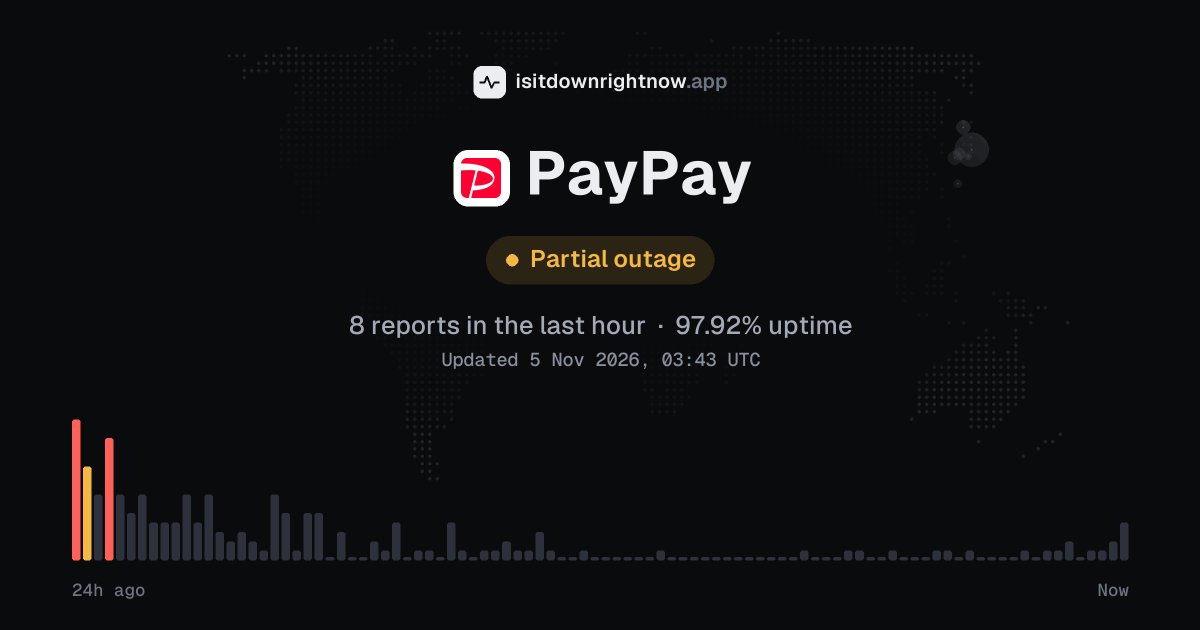
In the past 24 hours, 225 user reports came in for PayPay. Counting only the 15-minute windows with a spike big enough to count as an outage, that comes to 94.79% uptime for the day.
The most recent spike big enough to count as an outage was 21 hours ago. The busiest 15-minute window of the day had 15 reports, about 21 hours ago.
-
Outage
Ended 21 h agoLasted 2 h15peak reports
PayPay in November 2026
- Problem reports in November (since 3 November)
- 530
Monthly report for November 2026
What went wrong
What people said was wrong in recent problem reports for PayPay.
Share of 25 recent reports that said what was wrong.
PayPay problem spikes, last 30 days
Since 3 November, PayPay had 2 outage spikes and 1 period of elevated reports. The longest lasted 2 h 54 min, on 3 November.
-
Elevated reports
Wed 4 Nov, 06:05–06:20Lasted 15 min10peak reports
-
Outage
Wed 4 Nov, 03:42–05:42Lasted 2 h17peak reports
-
Outage
Lasted 2 h 54 min105peak reports
A spike is a sharp rise in problem reports from users, kept exactly as this page showed it at the time. This history starts on 3 November 2026. Monthly reports for all services
How to fix PayPay not working
PayPay is up on our end, so if it won't work for you, the problem is most likely on your side. Work through these in order:
Your browser tries to reach paypay.ne.jp over your own connection, right now. Nothing is sent to us or stored.
Reload and restart
Reload the page (Ctrl+F5, or Cmd+Shift+R on a Mac), or fully close the app and open it again.
Try another connection
Switch between Wi-Fi and mobile data. If it works on one and not the other, the problem is your network, not PayPay.
Update the app
Install the latest version from the App Store or Google Play. Old versions can stop connecting after a server-side change.
While PayPay is down: what to use instead
- Cash Use yen notes or coins at stores that can take them, since this avoids app login and code display problems.
- Credit or debit card Try a Visa, Mastercard, JCB, or other physical card when the register's card terminal is working.
- Transit IC card Suica, PASMO, ICOCA, and similar cards can cover small purchases at many convenience stores and vending machines.
- Another QR payment app Rakuten Pay, d払い, au PAY, or Merpay may help at a merchant that accepts more than one code payment service.
Problems at the same time as PayPay
Since 3 November, all 3 of PayPay's spikes in problem reports overlapped a spike at another service.
When several services get problem reports at once, something they share, such as a cloud host or a network, can be the real cause. Matching times alone do not prove it.
Most often at the same time
- Capital One3 times
- USPS3 times
- Archive of Our Own3 times
- Minecraft3 times
- Robinhood3 times
- Banamex3 times
How many of PayPay's spikes overlapped one of theirs.
During the latest spike
PayPay: Wed 4 Nov, 06:05 to 06:20
- Capital One, outage,3 Nov 08:52 to 06:46
- USPS, outage,3 Nov 11:10 to 10:09
- Archive of Our Own, outage,3 Nov 18:00 to 09:51
- Minecraft, outage,3 Nov 19:40 to 07:55
- Robinhood, outage,01:17 to 07:17
- Banamex, outage,03:27 to 06:27
- Truth Social, outage,04:12 to 06:57
- Canvas by Instructure, outage,04:57 to 06:12
25 more services. Red dot: outage. Amber dot: elevated reports.
A spike is a sharp rise in problem reports from users, as the live pages showed it. Times are Central European time.
When people report PayPay problems
The busiest hour for reports about PayPay is 07:00 to 08:00 Central European time, and the busiest day is Wednesday.
By hour of the day
- 00:00 to 01:00: 0.07 reports on an average day
- 01:00 to 02:00: 0.03 reports on an average day
- 02:00 to 03:00: 0.15 reports on an average day
- 03:00 to 04:00: 0.58 reports on an average day
- 04:00 to 05:00: 0 reports on an average day
- 05:00 to 06:00: 0.23 reports on an average day
- 06:00 to 07:00: 0.55 reports on an average day
- 07:00 to 08:00: 0.71 reports on an average day
- 08:00 to 09:00: 0.41 reports on an average day
- 09:00 to 10:00: 0.52 reports on an average day
- 10:00 to 11:00: 0.43 reports on an average day
- 11:00 to 12:00: 0.16 reports on an average day
- 12:00 to 13:00: 0.19 reports on an average day
- 13:00 to 14:00: 0.2 reports on an average day
- 14:00 to 15:00: 0.18 reports on an average day
- 15:00 to 16:00: 0.15 reports on an average day
- 16:00 to 17:00: 0.03 reports on an average day
- 17:00 to 18:00: 0 reports on an average day
- 18:00 to 19:00: 0.03 reports on an average day
- 19:00 to 20:00: 0 reports on an average day
- 20:00 to 21:00: 0 reports on an average day
- 21:00 to 22:00: 0.03 reports on an average day
- 22:00 to 23:00: 0.07 reports on an average day
- 23:00 to 00:00: 0.03 reports on an average day
By day of the week
- Monday: 0 reports on an average Monday
- Tuesday: 0 reports on an average Tuesday
- Wednesday: 34 reports on an average Wednesday
- Thursday: 1.2 reports on an average Thursday
- Friday: 0 reports on an average Friday
- Saturday: 0 reports on an average Saturday
- Sunday: 0 reports on an average Sunday
Each bar is the average number of user reports in that hour, or on that day of the week, from 28 days of reports since 5 October 2026. The busiest bar is highlighted. Spikes in reports are left out, so one outage does not set the pattern.
PayPay IP address, servers and network
Checking paypay.ne.jp from our server…
Service updates from @PayPayOfficial
No posts about problems from @PayPayOfficial in the last 14 days. The latest is from .
Contact PayPay support
Tip: PayPay doesn't list a public status page that we know of, so its help centre and the report chart on this page are the best places to check.
Put the PayPay status badge on your site
Paste one of these into a web page, a blog post or a README. The badge shows the same status as this page, based on user problem reports. Browsers can keep a copy for up to 4 hours. It links back here.

<a href="https://isitdownrightnow.app/services/paypay/"><img src="https://isitdownrightnow.app/badge/paypay.svg" alt="PayPay status" height="20"></a>[](https://isitdownrightnow.app/services/paypay/)The badge is a plain image: no scripts, no cookies. People who see it on your page load it from our server.
How we track PayPay
The status on this page comes from user-submitted problem reports for PayPay, counted in 15-minute windows over the last 24 hours. Each window is compared with the normal level for PayPay, so a few complaints on a quiet day don't trigger anything, but a sudden jump well above normal does.
When reports climb well above normal, the status here changes to partial outage or major outage and the chart moves with it. PayPay doesn't publish a public status page that we know of, so user reports are often the quickest sign that something is wrong on their side.