
Bouygues Télécom outages and problems
User reports, last 24 hours
706 reports in total, counted in 15-minute windows
In the last hour, 8 problem reports came in for Bouygues Télécom, against about 4 at this time on a usual day. Over the last 24 hours there were 706 reports. Most recent reports were about broadband internet (54%) and mobile internet (18%). The last spike in reports was 2 h ago and lasted 30 min. These are user reports from France, where most people report Bouygues Télécom problems.
- NormalClose to the usual level22 h 15 min · 578 reports
- ElevatedMore than 1.5 times the usual level1 h 15 min · 84 reports
- OutageMore than twice the usual level and far above the day's average30 min · 44 reports
- Usual levelWhat a usual day sees at that timeAbout 4 an hour now
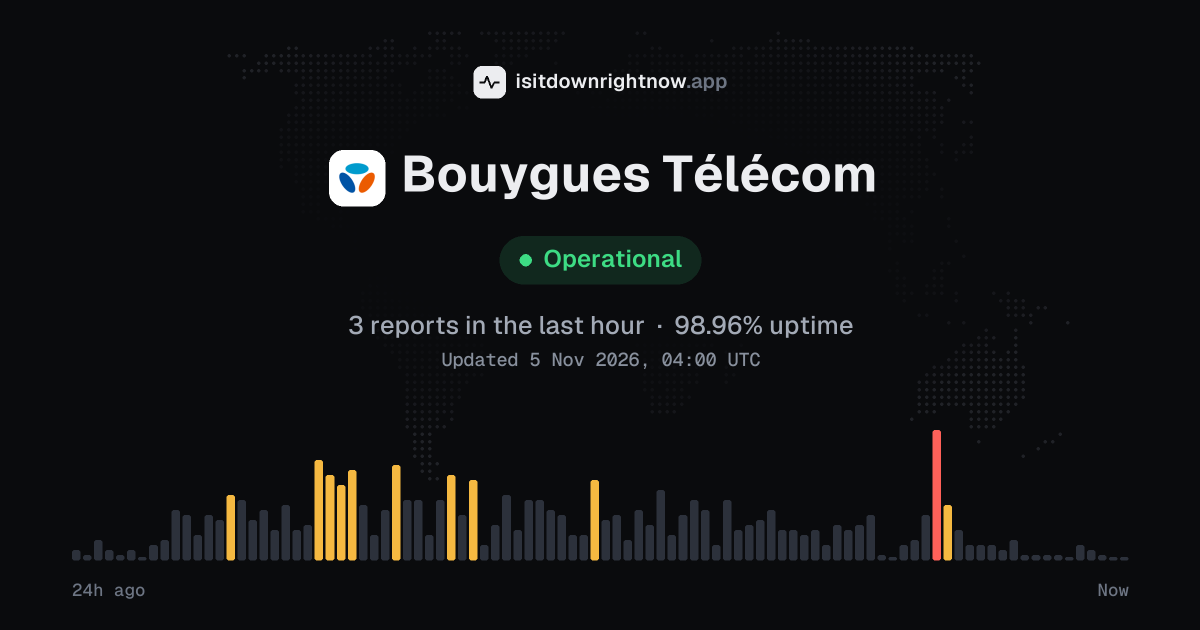
In the past 24 hours, 706 user reports came in for Bouygues Télécom. Counting only the 15-minute windows with a spike big enough to count as an outage, that comes to 97.92% uptime for the day.
The most recent spike big enough to count as an outage was 3 hours ago. The busiest 15-minute window of the day had 22 reports, about 16 hours ago.
-
Outage
Ended 2 h agoLasted 30 min22peak reports
-
Elevated reports
Ended 13 h agoLasted 15 min18peak reports
-
Elevated reports
Ended 15 h agoLasted 15 min18peak reports
-
Outage
Ended 16 h agoLasted 30 min22peak reports
-
Elevated reports
Ended 18 h agoLasted 15 min15peak reports
Bouygues Télécom in November 2026
- Problem reports in November (since 3 November)
- 813
Monthly report for November 2026
What went wrong
What people said was wrong in recent problem reports for Bouygues Télécom.
Share of 176 recent reports that said what was wrong.
Bouygues Télécom problem spikes, last 30 days
Since 3 November, Bouygues Télécom had 3 outage spikes and 5 periods of elevated reports. The longest lasted 1 h 2 min, on 3 November.
-
Outage
Thu 5 Nov, 00:23–00:53Lasted 30 min29peak reports
-
Elevated reports
Wed 4 Nov, 16:41–17:02Lasted 21 min16peak reports
-
Elevated reports
Wed 4 Nov, 15:16–15:31Lasted 15 min15peak reports
-
Elevated reports
Wed 4 Nov, 13:27–14:12Lasted 45 min21peak reports
-
Elevated reports
Wed 4 Nov, 12:12–12:38Lasted 26 min20peak reports
-
Outage
Wed 4 Nov, 10:33–11:33Lasted 1 h25peak reports
-
Elevated reports
Wed 4 Nov, 08:33–08:53Lasted 21 min16peak reports
-
Outage
Tue 3 Nov, 23:59–01:00Lasted 1 h 2 min28peak reports
A spike is a sharp rise in problem reports from users, kept exactly as this page showed it at the time. This history starts on 3 November 2026. Monthly reports for all services
How to fix Bouygues Télécom not working
Bouygues Télécom is up on our end, so if it won't work for you, the problem is most likely on your side. Work through these in order:
Your browser tries to reach bouyguestelecom.fr over your own connection, right now. Nothing is sent to us or stored.
Refresh Bouygues mobile service
If your phone shows No Service or mobile data will not load, turn Airplane Mode on for 10 seconds and turn it off again. On iPhone, use Control Center or Settings > Airplane Mode; on Android, use Settings > Network & internet > Airplane mode.
Check the Bouygues data SIM
On iPhone, open Settings > Cellular and check that Cellular Data is on. On Android with the standard Settings app, open Settings > Network & internet > SIMs > Bouygues Telecom, then check that Mobile data is on and that this SIM is selected for data if you have two SIMs.
Power-cycle the Bbox
If Wi-Fi at home is connected but pages do not load, unplug the Bbox power cable and wait 30 seconds before plugging it back in. Wait for the internet light to settle, then test bouyguestelecom.fr or the Espace Client app on the same Wi-Fi network.
Reset Bouygues network settings
Use this after the quicker checks, because it removes saved Wi-Fi networks and Bluetooth pairings. On iPhone, open Settings > General > Transfer or Reset iPhone > Reset > Reset Network Settings; on Android with the standard Settings app, open Settings > System > Reset options > Reset Wi-Fi, mobile & Bluetooth.
While Bouygues Télécom is down: what to use instead
- Espace Client app If the website will not load, try the Espace Client app to check your line, bills, or mobile usage from your phone.
- Orange If you need another French mobile network for calls or data, Orange is a common fallback with prepaid and contract options.
- SFR If your Bouygues Télécom connection is unusable, an SFR line can keep a phone, tablet, or home internet setup online.
- Free Mobile If you need a short-term mobile backup in France, Free Mobile is another widely used carrier to consider.
Problems at the same time as Bouygues Télécom
Since 3 November, all 8 of Bouygues Télécom's spikes in problem reports overlapped a spike at another service.
When several services get problem reports at once, something they share, such as a cloud host or a network, can be the real cause. Matching times alone do not prove it.
Most often at the same time
- Freenet8 times
- USPS8 times
- Sainsbury’s8 times
- Archive of Our Own7 times
- Klarmobil7 times
- Banco Itaú7 times
How many of Bouygues Télécom's spikes overlapped one of theirs.
During the latest spike
Bouygues Télécom: Thu 5 Nov, 00:23 to 00:53
- Facebook, outage,4 Nov 13:53 to 03:08
- Deutsche Glasfaser, outage,4 Nov 14:08 to 02:08
- Capital One, outage,4 Nov 16:53 to 03:08
- X (Twitter), outage,4 Nov 18:08 to 00:53
- Escape from Tarkov, outage,4 Nov 18:23 to 01:08
- Roblox, outage,4 Nov 19:38 to 01:08
- Koodo, outage,4 Nov 19:53 to 02:08
- Minecraft, outage,4 Nov 20:08 to 00:53
66 more services. Red dot: outage. Amber dot: elevated reports.
A spike is a sharp rise in problem reports from users, as the live pages showed it. Times are Central European time.
When people report Bouygues Télécom problems
The busiest hour for reports about Bouygues Télécom is 09:00 to 10:00 Central European time, and the busiest day is Wednesday.
By hour of the day
- 00:00 to 01:00: 0.46 reports on an average day
- 01:00 to 02:00: 0.79 reports on an average day
- 02:00 to 03:00: 0.6 reports on an average day
- 03:00 to 04:00: 0.23 reports on an average day
- 04:00 to 05:00: 0.16 reports on an average day
- 05:00 to 06:00: 0.34 reports on an average day
- 06:00 to 07:00: 0.18 reports on an average day
- 07:00 to 08:00: 1 report on an average day
- 08:00 to 09:00: 1 report on an average day
- 09:00 to 10:00: 1.3 reports on an average day
- 10:00 to 11:00: 1.2 reports on an average day
- 11:00 to 12:00: 0.28 reports on an average day
- 12:00 to 13:00: 0.77 reports on an average day
- 13:00 to 14:00: 0.64 reports on an average day
- 14:00 to 15:00: 0.89 reports on an average day
- 15:00 to 16:00: 1.1 reports on an average day
- 16:00 to 17:00: 0.67 reports on an average day
- 17:00 to 18:00: 0.77 reports on an average day
- 18:00 to 19:00: 1.3 reports on an average day
- 19:00 to 20:00: 1.3 reports on an average day
- 20:00 to 21:00: 1.1 reports on an average day
- 21:00 to 22:00: 0.79 reports on an average day
- 22:00 to 23:00: 0.77 reports on an average day
- 23:00 to 00:00: 0.56 reports on an average day
By day of the week
- Monday: 0 reports on an average Monday
- Tuesday: 0.69 reports on an average Tuesday
- Wednesday: 125 reports on an average Wednesday
- Thursday: 11 reports on an average Thursday
- Friday: 0 reports on an average Friday
- Saturday: 0 reports on an average Saturday
- Sunday: 0 reports on an average Sunday
Each bar is the average number of user reports in that hour, or on that day of the week, from 28 days of reports since 5 October 2026. The busiest bar is highlighted. Spikes in reports are left out, so one outage does not set the pattern.
What happens when Bouygues Télécom goes down
Bouygues Télécom is a French telecom operator with mobile service, Bbox home internet, fixed phone, and TV offers. An outage can cut mobile service and Bbox home internet, so calls fail, Wi-Fi drops, TV stops, and bill payment may not load.
On mobile, phones may show no service and calls may fail to connect; texts can arrive late when the network is unstable. With Bbox, the Wi-Fi name may still appear, but pages spin or devices say there is no internet connection. Data access is often the first thing people notice, because apps and web pages stop loading before they test voice or TV; live channels or replay can freeze too. Problems can be regional or partial, with one area or one access type affected while the rest still works elsewhere.
Bouygues Télécom IP address, servers and network
- IPv4 address
- 23.45.238.43
- IPv6
- Not offered
- Network
- AS16625 · Akamai Technologies, Inc., registered in the United States
- Served through
- Akamai
- DNS hosted by
- its own name servers (perf1.fr)
- HTTPS certificate
- Issued by Sectigo Limited, valid until 4 May 2027 (179 days)
- HTTP/3
- Not advertised
- Our check
- Answered in 139 ms
Checked from our server in Frankfurt, Germany, less than an hour ago, for www.bouyguestelecom.fr. A service behind a CDN answers from many data centres, usually the one nearest to you, so these addresses are where its traffic enters, not where its own servers stand. Visitors elsewhere may see different addresses.
Checked from 12 places around the world
All 12 locations got an answer from bouyguestelecom.fr. Fastest from Paris (25 ms), slowest from Tokyo (731 ms). Every location connected to the same address, on Bouygues Telecom SA (AS5410).
| Location | Result | Time | Address reached |
|---|---|---|---|
| FrankfurtGermany | Up · HTTP 301 | 61 ms | 194.158.122.212 |
| ViennaAustria | Up · HTTP 301 | 342 ms | 194.158.122.212 |
| MilanItaly | Up · HTTP 301 | 59 ms | 194.158.122.212 |
| ParisFrance | Up · HTTP 301 | 25 ms | 194.158.122.212 |
| AmsterdamNetherlands | Up · HTTP 301 | 54 ms | 194.158.122.212 |
| MadridSpain | Up · HTTP 301 | 103 ms | 194.158.122.212 |
| WarsawPoland | Up · HTTP 301 | 113 ms | 194.158.122.212 |
| DallasUSA | Up · HTTP 301 | 365 ms | 194.158.122.212 |
| Los AngelesUSA | Up · HTTP 301 | 439 ms | 194.158.122.212 |
| São PauloBrazil | Up · HTTP 301 | 595 ms | 194.158.122.212 |
| SingaporeSingapore | Up · HTTP 301 | 502 ms | 194.158.122.212 |
| TokyoJapan | Up · HTTP 301 | 731 ms | 194.158.122.212 |
Checked with check-host.net from its servers in these cities less than an hour ago, for bouyguestelecom.fr. Time is how long each server took to load the page.
Bouygues Télécom FAQ
Is Bouygues Télécom down right now?
Why does my Bbox say it is connected but websites still will not load?
Why can I not sign in to Espace Client or the Bouygues Telecom app?
Why are calls or mobile data failing on my Bouygues Télécom SIM in France?
Why does the bill or card payment page fail after bank validation?
Service updates from @bouyguestelecom
No posts about problems from @bouyguestelecom in the last 14 days. The latest is from .
Contact Bouygues Télécom support
- Help centrecontact.bouyguestelecom.fr/?informations_souhaitees=futurs_clients
- Websitebouyguestelecom.fr
- X (Twitter)x.com/bouyguestelecom
- Facebookfacebook.com/94533530492
Tip: Bouygues Télécom doesn't list a public status page that we know of, so its help centre and the report chart on this page are the best places to check.
Put the Bouygues Télécom status on your site
Paste one of these into a web page, a blog post or a README: a small badge, or a card with the chart. Both show the same status as this page, based on user problem reports, and link back here.

<a href="https://isitdownrightnow.app/services/bouygues-telecom/"><img src="https://isitdownrightnow.app/badge/bouygues-telecom.svg" alt="Bouygues Télécom status" height="20"></a>[](https://isitdownrightnow.app/services/bouygues-telecom/)A live card with the chart
The status, reports in the last hour and the last 24 hours, updated every 5 minutes. Use the frame, or the image where frames are not allowed, such as newsletters.
<iframe src="https://isitdownrightnow.app/embed/bouygues-telecom/" title="Bouygues Télécom status" width="100%" height="230" style="border:0;max-width:560px" loading="lazy"></iframe>
<p><a href="https://isitdownrightnow.app/services/bouygues-telecom/">Bouygues Télécom status</a> from IsItDownRightNow.app</p><a href="https://isitdownrightnow.app/services/bouygues-telecom/"><img src="https://isitdownrightnow.app/share/bouygues-telecom.png" alt="Bouygues Télécom status: problem reports over the last 24 hours" width="600" height="315" loading="lazy"></a>[](https://isitdownrightnow.app/services/bouygues-telecom/)Badge, frame and image load no scripts from other sites and set no cookies; people who see them on your page load them from our server. More for journalists.
How we track Bouygues Télécom
The status on this page comes from user-submitted problem reports for Bouygues Télécom, counted in 15-minute windows over the last 24 hours. Each window is compared with the normal level for Bouygues Télécom, so a few complaints on a quiet day don't trigger anything, but a sudden jump well above normal does.
When reports climb well above normal, the status here changes to partial outage or major outage and the chart moves with it. Bouygues Télécom doesn't publish a public status page that we know of, so user reports are often the quickest sign that something is wrong on their side.