
For Honor outages and problems
User reports, last 24 hours
3 reports in total, counted in 15-minute windows
In the last hour, 1 problem report came in for For Honor, and at this time of day there are usually almost none. Over the last 24 hours there were 3 reports. The last spike in reports was 478 h ago and lasted 30 min. These are user reports from the US, where most people report For Honor problems.
Around the world right now: normal in 17 other countries. By country
- NormalClose to the usual level24 h · 3 reports
- ElevatedMore than 1.5 times the usual levelNone in this chart
- OutageMore than twice the usual level and far above the day's averageNone in this chart
- Usual levelWhat a usual day sees at that timeAlmost none at this time of day
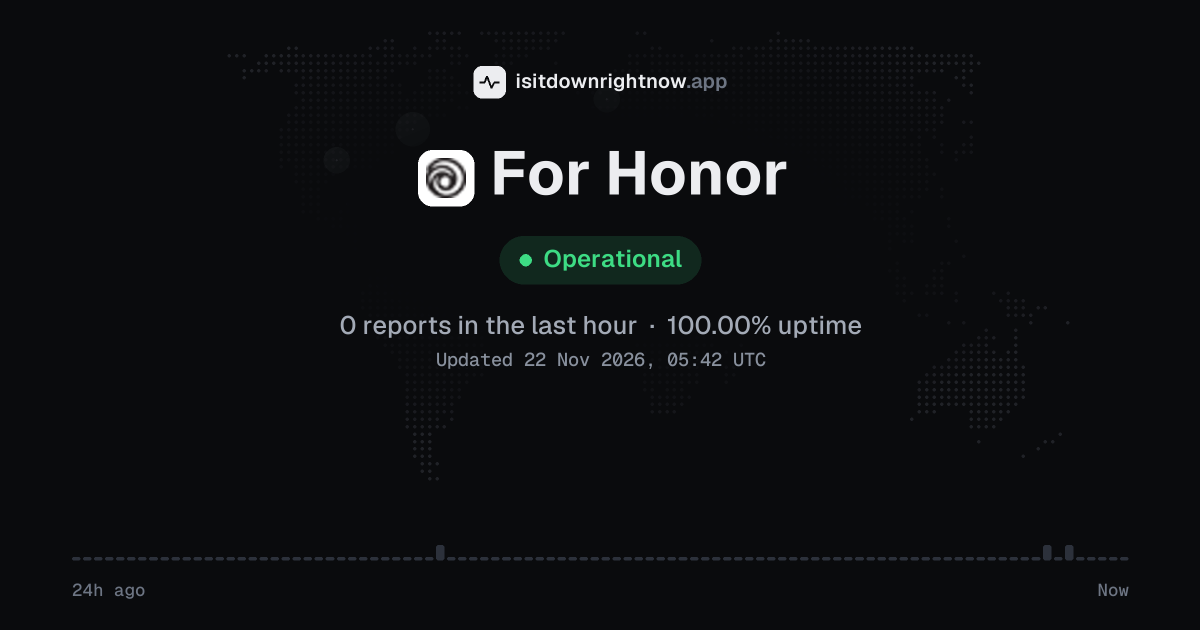
In the past 24 hours, 3 user reports came in for For Honor. Counting only the 15-minute windows with a spike big enough to count as an outage, that comes to 100.00% uptime for the day.
The busiest 15-minute window had 1 report, about 15 hours ago. That stays below our outage threshold, so it doesn't count as downtime.
For Honor in November 2026
- Problem reports in November
- 275
Monthly report for November 2026
People who report a problem with For Honor to the outage-report feed behind this page can tag what is affected. These are the categories they can pick; the feed shows no counts per category:
- Login
- Purchases
- Server Connection
- Game Play
- Game Launch
- Lag / Latency
For Honor reports around the world
In the last 24 hours, 4 problem reports about For Honor came in from 2 countries. Right now reports are at the usual level in every country.
- Outage now
- Problems now
- Normal
| Country | Now | Last hour | 24 hours |
|---|---|---|---|
| The US numbers above | Normal | 1 | 3 |
| France | Normal | 0 | 1 |
| Germany | Normal | 0 | 0 |
| Canada | Normal | 0 | 0 |
| The Netherlands | Normal | 0 | 0 |
| The UK | Normal | 0 | 0 |
| Australia | Normal | 0 | 0 |
| Italy | Normal | 0 | 0 |
| Austria | Normal | 0 | 0 |
| Sweden | Normal | 0 | 0 |
| Denmark | Normal | 0 | 0 |
| Spain | Normal | 0 | 0 |
Each country's status compares its reports with the usual level there. 6 more countries had 0 reports in the last 24 hours. Map outlines: Natural Earth.
For Honor problem spikes, last 30 days
In the last 30 days, For Honor had 1 outage spike.
- Sat 24 Oct: 0 reports
- Sun 25 Oct: 0 reports
- Mon 26 Oct: 0 reports
- Tue 27 Oct: 0 reports
- Wed 28 Oct: 4 reports
- Thu 29 Oct: 22 reports
- Fri 30 Oct: 17 reports
- Sat 31 Oct: 10 reports
- Sun 1 Nov: 7 reports
- Mon 2 Nov: 35 reports (outage spike that day)
- Tue 3 Nov: 4 reports
- Wed 4 Nov: 6 reports
- Thu 5 Nov: 11 reports
- Fri 6 Nov: 13 reports
- Sat 7 Nov: 7 reports
- Sun 8 Nov: 16 reports
- Mon 9 Nov: 12 reports
- Tue 10 Nov: 5 reports
- Wed 11 Nov: 11 reports
- Thu 12 Nov: 7 reports
- Fri 13 Nov: 13 reports
- Sat 14 Nov: 28 reports
- Sun 15 Nov: 21 reports
- Mon 16 Nov: 12 reports
- Tue 17 Nov: 21 reports
- Wed 18 Nov: 16 reports
- Thu 19 Nov: 14 reports
- Fri 20 Nov: 7 reports
- Sat 21 Nov: 7 reports
- Sun 22 Nov: 2 reports
-
Outage
Mon 2 Nov, 07:49–08:19Lasted 30 min21peak reports
By country
In the last 26 days, most For Honor problem reports came from the US (323), Italy (25) and the UK (20). None of these countries had a day at outage level.
- The USNo spikes323
- ItalyNo spikes25
- The UKNo spikes20
- CanadaNo spikes14
- FranceNo spikes14
- GermanyNo spikes12
- BrazilNo spikes10
- The NetherlandsNo spikes10
- Outage spike
- Elevated reports
- Normal
- No data yet
Each square is one day. It turns red when reports stayed at outage level for half an hour or more, and amber when they stayed above the usual level for an hour or more. The number on the right is the country's total since 28 October 2026, when country history starts. A wider gap marks a Monday. Point at a square, or tap it, for that day's numbers. Days run from midnight to midnight, Central European time.
A spike is a sharp rise in problem reports from users, kept exactly as this page showed it at the time. Monthly reports for all services
How to fix For Honor not working
For Honor is up on our end, so if it won't work for you, the problem is most likely on your side. Work through these in order:
Your browser tries to reach ubisoft.com over your own connection, right now. Nothing is sent to us or stored.
Check the official status page
Open the official status page first. If Ubisoft reports a problem with For Honor, waiting is the fix; if the page is clear, move on to your own setup.
Restart For Honor and Ubisoft Connect
Quit Ubisoft Connect from the system tray, then reopen it and the game. On console, use the power menu to restart the console; standby can keep a stale network session. A full restart clears that session.
Test your network and go wired
Test the local network. On PlayStation, go to Settings > Network > Test Internet Connection; on Xbox, go to Settings > General > Network settings > Test network connection. Plug the console or PC into the router with an Ethernet cable for the test, because Wi-Fi dropouts look like For Honor disconnects but start at your end.
Flush DNS and open a support case
On PC, open Command Prompt as administrator and run ipconfig /flushdns, then restart your PC and try For Honor again. That clears a stale DNS cache. If the problem follows your account to another network, open a case through the help centre with your platform and the exact error message.
While For Honor is down: what to use instead
- Chivalry 2 If you want first-person melee and big team fights, Chivalry 2 runs on PC, PlayStation and Xbox with crossplay, so matches usually fill fast.
- Mount & Blade II: Bannerlord Its single-player campaign runs offline, so server trouble won't stop you.
- Ubisoft status page Check the official For Honor status page before you restart your console or reinstall, because Ubisoft posts planned maintenance and known server problems there.
- Ubisoft Help Centre When the game keeps dropping you to the main menu while everything else on your connection works, the help centre has troubleshooting steps and a way to contact support about your account.
Fix For Honor on Windows, Mac, Android and iPhone
For Honor on Windows
- Fix
- Verify the integrity of For Honor's game files on Ubisoft Connect or Steam, and ensure your graphics drivers are fully updated. You can also try running the game as an administrator to bypass permission issues.
- Check
- Check the official Ubisoft Help website or the For Honor social media accounts for scheduled maintenance. You can also check if the Ubisoft Connect client is online and connecting properly.
ping ubisoft.comTest whether For Honor's servers replynslookup ubisoft.comCheck that For Honor's DNS resolvestracert ubisoft.comTrace where the connection dropsipconfig /flushdnsClear the DNS cache, then reloadFor Honor on Mac
- Fix
- Since For Honor is not natively supported on macOS, troubleshoot your connection by restarting your cloud gaming service, like GeForce NOW, or updating your Boot Camp drivers. Ensure your network meets the high-bandwidth requirements for streaming.
- Check
- Determine if For Honor is down by checking the status of your cloud gaming provider alongside official Ubisoft server updates. If the cloud service is active but the game fails to load, Ubisoft's servers may be offline.
ping -c 4 ubisoft.comTest whether For Honor's servers replynslookup ubisoft.comCheck that For Honor's DNS resolvestraceroute ubisoft.comTrace where the connection dropssudo dscacheutil -flushcache; sudo killall -HUP mDNSResponderFlush the macOS DNS cache, then reloadFor Honor on Android
- Fix
- If you are streaming For Honor on Android via Xbox Cloud Gaming or GeForce NOW, clear the streaming app's cache and restart your device. Ensure you are connected to a high-speed 5GHz Wi-Fi or 5G connection for optimal performance.
- Check
- Check the status page of your mobile cloud streaming provider to see if their servers are active. Also, check the official For Honor social media channels to verify if Ubisoft's game servers are undergoing maintenance.
For Honor on iPhone and iPad
- Fix
- For iOS users streaming For Honor through web-based cloud services like GeForce NOW, clear your Safari browser cache and restart the web app. Ensure your iOS device is updated to the latest version and your internet connection is stable.
- Check
- Verify if the For Honor services are down by checking the Ubisoft Support status page or the platform status of your iOS-compatible cloud streaming service. If the stream connects but the game fails to start, the issue is on Ubisoft's end.
Problems at the same time as For Honor
In the last 30 days, For Honor's only spike in problem reports overlapped a spike at another service.
When several services get problem reports at once, something they share, such as a cloud host or a network, can be the real cause. Matching times alone do not prove it.
During the latest spike
For Honor: Mon 2 Nov, 07:49 to 08:19
- YouTube, outage,1 Nov 00:43 to 3 Nov 07:18
- T-Fiber, outage,01:59 to 07:55
- Vodacom, outage,04:03 to 08:30
- National Lottery, outage,06:30 to 3 Nov 02:09
- Grok, outage,06:41 to 08:35
- MyQ, outage,06:53 to 07:58
- Dead by Daylight, outage,07:34 to 08:41
- PlayStation Network, outage,07:34 to 11:04
44 more services. Red dot: outage. Amber dot: elevated reports.
A spike is a sharp rise in problem reports from users, as the live pages showed it. Times are Central European time.
When people report For Honor problems
The busiest hour for reports about For Honor is 23:00 to 00:00 Central European time, and the busiest day is Thursday.
By hour of the day
- 00:00 to 01:00: 0.59 reports on an average day
- 01:00 to 02:00: 0.49 reports on an average day
- 02:00 to 03:00: 0.43 reports on an average day
- 03:00 to 04:00: 0.5 reports on an average day
- 04:00 to 05:00: 0.37 reports on an average day
- 05:00 to 06:00: 0.37 reports on an average day
- 06:00 to 07:00: 0.5 reports on an average day
- 07:00 to 08:00: 0.49 reports on an average day
- 08:00 to 09:00: 0.07 reports on an average day
- 09:00 to 10:00: 0.07 reports on an average day
- 10:00 to 11:00: 0.05 reports on an average day
- 11:00 to 12:00: 0.02 reports on an average day
- 12:00 to 13:00: 0.02 reports on an average day
- 13:00 to 14:00: 0.1 reports on an average day
- 14:00 to 15:00: 0.1 reports on an average day
- 15:00 to 16:00: 0.12 reports on an average day
- 16:00 to 17:00: 0.14 reports on an average day
- 17:00 to 18:00: 0.21 reports on an average day
- 18:00 to 19:00: 0.19 reports on an average day
- 19:00 to 20:00: 0.3 reports on an average day
- 20:00 to 21:00: 0.33 reports on an average day
- 21:00 to 22:00: 0.38 reports on an average day
- 22:00 to 23:00: 0.27 reports on an average day
- 23:00 to 00:00: 0.63 reports on an average day
By day of the week
- Monday: 5.8 reports on an average Monday
- Tuesday: 4.3 reports on an average Tuesday
- Wednesday: 6.4 reports on an average Wednesday
- Thursday: 9 reports on an average Thursday
- Friday: 7.2 reports on an average Friday
- Saturday: 7.5 reports on an average Saturday
- Sunday: 7.2 reports on an average Sunday
Each bar is the average number of user reports in that hour, or on that day of the week, from 46 days of reports since 5 October 2026. The busiest bar is highlighted. Spikes in reports are left out, so one outage does not set the pattern.
What happens when For Honor goes down
For Honor is a melee combat game from Ubisoft where Knights, Vikings, Samurai, and Wu Lin factions fight over territory in modes such as Dominion and Breach. Players on PC and console rely on its online matchmaking and progression, so an outage cuts off group fights and earned rewards.
Login and matchmaking usually fail first: you get stuck at the title screen or a match search that never fills. A match already underway can drop everyone at once. The faction war map stops updating because results cannot post, and rewards or progression may stall after a win, so gear and steel do not appear until the service recovers. Problems often hit one platform or region while other players keep playing, and the report count at the top of the page tracks complaints above their usual level; it does not come from a ping or probe.
For Honor IP address, servers and network
- IPv4 addresses
- 3.160.150.105
Show all 4
- 3.160.150.109
- 3.160.150.112
- 3.160.150.68
- IPv6 addresses
- 2600:9000:275b:1200:5:ba7e:5540:93a1
Show all 8
- 2600:9000:275b:6c00:5:ba7e:5540:93a1
- 2600:9000:275b:9e00:5:ba7e:5540:93a1
- 2600:9000:275b::5:ba7e:5540:93a1
- 2600:9000:275b:a000:5:ba7e:5540:93a1
- 2600:9000:275b:a00:5:ba7e:5540:93a1
- 2600:9000:275b:b000:5:ba7e:5540:93a1
- 2600:9000:275b:fa00:5:ba7e:5540:93a1
- Network
- AS16509 · Amazon.com, Inc., registered in the United States
- Served through
- Amazon CloudFront · our check was answered by its Frankfurt (FRA) data centre
- DNS hosted by
- its own name servers (ubisoft.com)
- HTTPS certificate
- Issued by Amazon, valid until 2 Mar 2027 (99 days)
- HTTP/3
- Supported
- Our check
- Answered in 400 ms
Checked from our server in Frankfurt, Germany, 1 h ago, for www.ubisoft.com. A service behind a CDN answers from many data centres, usually the one nearest to you, so these addresses are where its traffic enters, not where its own servers stand. Visitors elsewhere may see different addresses.
Checked from 12 places around the world
All 12 locations got an answer from www.ubisoft.com. Fastest from Los Angeles (101 ms), slowest from Singapore (1,280 ms). Every location connected through Amazon.com, Inc. (AS16509), using 12 different addresses.
| Location | Result | Time | Address reached |
|---|---|---|---|
| FrankfurtGermany | Up · HTTP 302 | 126 ms | 3.160.150.109data centre in Frankfurt |
| ViennaAustria | Up · HTTP 302 | 136 ms | 3.165.206.88data centre in Vienna |
| MilanItaly | Up · HTTP 302 | 132 ms | 99.86.171.108data centre in Milan |
| ParisFrance | Up · HTTP 302 | 170 ms | 99.86.109.26data centre in Paris |
| AmsterdamNetherlands | Up · HTTP 302 | 133 ms | 108.156.60.66data centre in Amsterdam |
| MadridSpain | Up · HTTP 302 | 179 ms | 13.224.83.58data centre in Madrid |
| WarsawPoland | Up · HTTP 302 | 210 ms | 18.66.233.119data centre in Warsaw |
| DallasUSA | Up · HTTP 302 | 823 ms | 65.9.62.34data centre in Stockholm |
| Los AngelesUSA | Up · HTTP 302 | 101 ms | 99.84.215.41data centre in Los Angeles |
| São PauloBrazil | Up · HTTP 302 | 406 ms | 13.225.196.119data centre in Montreal |
| SingaporeSingapore | Up · HTTP 302 | 1,280 ms | 65.9.62.77data centre in Stockholm |
| TokyoJapan | Up · HTTP 302 | 433 ms | 99.84.215.34data centre in Los Angeles |
Checked with check-host.net from its servers in these cities 1 h ago, for www.ubisoft.com. Time is how long each server took to load the page. Data-centre cities come from the names the network gives its servers.
For Honor FAQ
Is For Honor down right now?
Why do I keep getting dropped mid-match with a message about the host?
The game won't get past the Ubisoft Connect sign-in. What can I do?
Will turning cross-play off change who I get matched with?
I bought Steel and it never appeared in my account.
Contact For Honor support
- Official status pageubisoft.com/en-us/game/for-honor/status
- Help centresupport.ubisoft.com
- Websiteubisoft.com
Tip: when For Honor is down, its official status page is the quickest way to confirm the cause and see when a fix is expected.
About For Honor
- Category
- Online Service
Put the For Honor status on your site
Paste one of these into a web page, a blog post or a README: a small badge, or a card with the chart. Both show the same status as this page, based on user problem reports, and link back here.

<a href="https://isitdownrightnow.app/services/for-honor/"><img src="https://isitdownrightnow.app/badge/for-honor.svg" alt="For Honor status" height="20"></a>[](https://isitdownrightnow.app/services/for-honor/)A live card with the chart
The status, reports in the last hour and the last 24 hours, updated every 5 minutes. Use the frame, or the image where frames are not allowed, such as newsletters.
<iframe src="https://isitdownrightnow.app/embed/for-honor/" title="For Honor status" width="100%" height="230" style="border:0;max-width:560px" loading="lazy"></iframe>
<p><a href="https://isitdownrightnow.app/services/for-honor/">For Honor status</a> from IsItDownRightNow.app</p><a href="https://isitdownrightnow.app/services/for-honor/"><img src="https://isitdownrightnow.app/share/for-honor.png" alt="For Honor status: problem reports over the last 24 hours" width="600" height="315" loading="lazy"></a>[](https://isitdownrightnow.app/services/for-honor/)Badge, frame and image load no scripts from other sites and set no cookies; people who see them on your page load them from our server. More for journalists.
How we track For Honor
The status on this page comes from user-submitted problem reports for For Honor, counted in 15-minute windows over the last 24 hours. Each window is compared with the normal level for For Honor, so a few complaints on a quiet day don't trigger anything, but a sudden jump well above normal does.
When reports climb well above normal, the status here changes to partial outage or major outage and the chart moves with it. This is separate from For Honor's official status page: user reports tend to show a problem early, while the official page confirms the cause. If the two disagree, check both.