
Certains clients en Nouvelle-Écosse, entre Sydney et Truro, pourraient être touchés par une interruption de service. Nous travaillons à rétablir le service le plus rapidement possible. Merci de votre patience.
Last 24 hours
Bell Aliant outages and problems
User reports, last 24 hours
73 reports in total, counted in 15-minute windows
In the last hour, 2 problem reports came in for Bell Aliant, against about 4 at this time on a usual day. Over the last 24 hours there were 73 reports. Most recent reports were about broadband internet (56%) and WiFi (24%). The last spike in reports was 18 h ago and lasted 15 min. These are user reports from Canada, where most people report Bell Aliant problems.
- NormalClose to the usual level24 h · 73 reports
- ElevatedMore than 1.5 times the usual levelNone in this chart
- OutageMore than twice the usual level and far above the day's averageNone in this chart
- Usual levelWhat a usual day sees at that timeAbout 4 an hour now
Reports, last hour
2
Same as the hour before
Uptime, 24 h
100.00%
No outage windows
Last outage
None
In the last 24 hours
Busiest 15 minutes
6
6 reports, 18 h ago
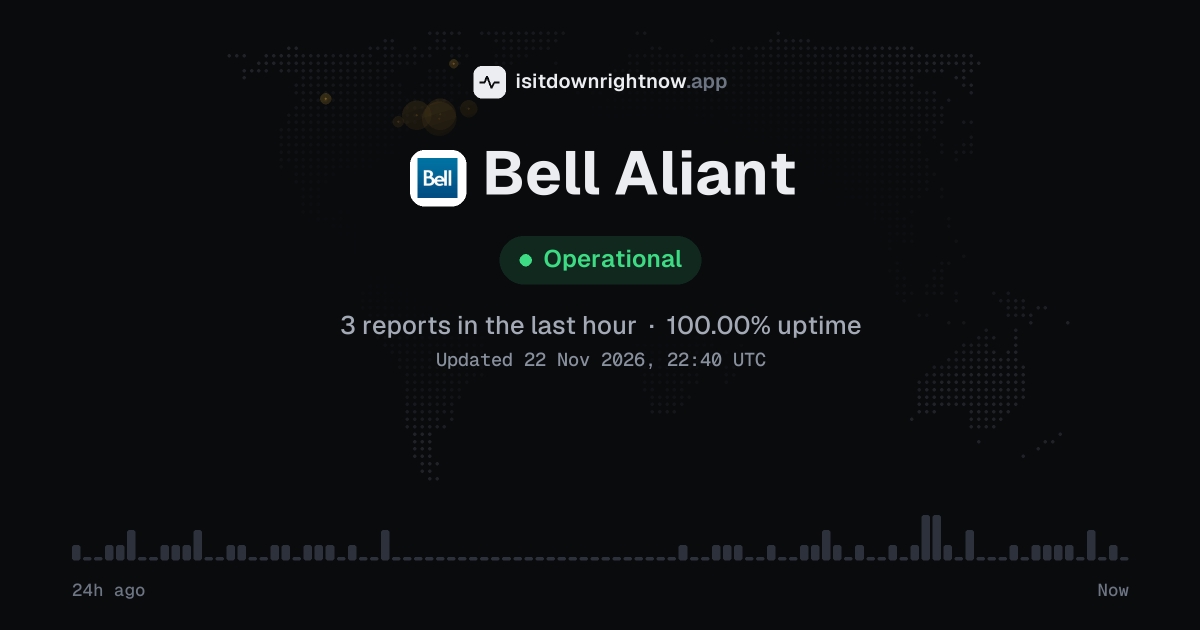
In the past 24 hours, 73 user reports came in for Bell Aliant. Counting only the 15-minute windows with a spike big enough to count as an outage, that comes to 100.00% uptime for the day.
The busiest 15-minute window had 6 reports, about 18 hours ago. That stays below our outage threshold, so it doesn't count as downtime.
No problems detected in the last 24 hoursReports for Bell Aliant stayed at their usual level the whole time.
This month
Bell Aliant in November 2026
- Problem reports in November
- 1,348
Monthly report for November 2026
What went wrong
What people said was wrong in recent problem reports for Bell Aliant.
Share of 25 recent reports that said what was wrong.
World map
Where Bell Aliant problem reports come from
The map shows where recent problem reports for Bell Aliant came from in Canada. Big cities always send the most, so dots in many places point to a widespread problem, and one area far ahead of the rest can mean a regional one.
- Outage now
- Problems now
- Normal
Map outlines: Natural Earth.
Last 30 days
Bell Aliant problem spikes, last 30 days
Since 28 October, Bell Aliant had 4 outage spikes and 1 period of elevated reports. The longest lasted 28 min, on 11 November.
- Sun 18 Oct: no data
- Mon 19 Oct: no data
- Tue 20 Oct: no data
- Wed 21 Oct: no data
- Thu 22 Oct: no data
- Fri 23 Oct: no data
- Sat 24 Oct: no data
- Sun 25 Oct: no data
- Mon 26 Oct: no data
- Tue 27 Oct: no data
- Wed 28 Oct: 51 reports
- Thu 29 Oct: 60 reports
- Fri 30 Oct: 31 reports
- Sat 31 Oct: 29 reports
- Sun 1 Nov: 47 reports
- Mon 2 Nov: 77 reports
- Tue 3 Nov: 92 reports
- Wed 4 Nov: 93 reports
- Thu 5 Nov: 112 reports
- Fri 6 Nov: 66 reports
- Sat 7 Nov: 52 reports
- Sun 8 Nov: 58 reports
- Mon 9 Nov: 78 reports (outage spike that day)
- Tue 10 Nov: 74 reports
- Wed 11 Nov: 90 reports (outage spike that day)
- Thu 12 Nov: 121 reports
- Fri 13 Nov: 168 reports (elevated reports that day)
- Sat 14 Nov: 138 reports (outage spike that day)
- Sun 15 Nov: 76 reports (outage spike that day)
- Mon 16 Nov: 6 reports
-
Outage
Sun 15 Nov, 08:28–08:43Lasted 15 min12peak reports
-
Outage
Sat 14 Nov, 00:26–00:52Lasted 26 min13peak reports
-
Elevated reports
Fri 13 Nov, 09:09–09:24Lasted 15 min10peak reports
-
Outage
Wed 11 Nov, 08:08–08:36Lasted 28 min16peak reports
-
Outage
Mon 9 Nov, 08:05–08:31Lasted 26 min18peak reports
A spike is a sharp rise in problem reports from users, kept exactly as this page showed it at the time. This history starts on 28 October 2026. Monthly reports for all services
Troubleshooting
How to fix Bell Aliant not working
Bell Aliant is up on our end, so if it won't work for you, the problem is most likely on your side. Work through these in order:
Your browser tries to reach aliant.bell.ca over your own connection, right now. Nothing is sent to us or stored.
Check a second device on your Bell Aliant Wi-Fi
Open a website on a phone and a laptop connected to the same Wi-Fi. If both fail, the problem is the network or service; if only one fails, keep working on that device.
Reconnect your device to Bell Aliant Wi-Fi
On iPhone, open Settings > Wi-Fi, tap the info button beside the network, then Forget This Network; on Android, open Settings > Network & internet > Wi-Fi, tap the saved network, then Forget. Join the network again and enter the Wi-Fi password.
Restart the Bell Aliant modem
Unplug the power cable from the modem and leave it out for 30 seconds before you plug it back in. Give the lights a few minutes to settle, then test the connection again. If you have a separate router, restart it after the modem.
Test a wired connection to the Bell Aliant modem
Connect a laptop to a LAN port on the modem with an Ethernet cable, then turn off Wi-Fi in the laptop's network settings. If a website loads over the cable, the problem is Wi-Fi. If it does not, contact the Bell Aliant help centre and say whether the modem lights are normal.
While it is down
While Bell Aliant is down: what to use instead
- Mobile hotspot Turn your phone into a hotspot when the home internet drops and you need a laptop online for work or email.
- Public Wi-Fi Use library or cafe Wi-Fi for a quick message or account check.
- Call from a mobile Call support from a mobile phone if the home phone is out.
- Help centre Open the help centre from a working connection if you need repair steps or account help while the service is out.
Same time
Problems at the same time as Bell Aliant
Since 28 October, all 5 of Bell Aliant's spikes in problem reports overlapped a spike at another service.
When several services get problem reports at once, something they share, such as a cloud host or a network, can be the real cause. Matching times alone do not prove it.
Most often at the same time
- Reddit5 times
- Bell Canada5 times
- Archive of Our Own4 times
- NTT Docomo4 times
- AT&T4 times
- Microsoft Outlook3 times
How many of Bell Aliant's spikes overlapped one of theirs.
During the latest spike
Bell Aliant: Sun 15 Nov, 08:28 to 08:43
- Microsoft Outlook, outage,12 Nov 17:42 to 16 Nov 02:34
- Microsoft 365, outage,12 Nov 17:59 to 16 Nov 02:34
- Bank of America, outage,14 Nov 12:10 to 09:17
- Archive of Our Own, outage,14 Nov 12:55 to 16 Nov 02:34
- Amazon, outage,14 Nov 18:01 to 08:56
- IRCTC, outage,02:23 to 09:49
- CelcomDigi, outage,02:49 to 08:34
- Chase, outage,04:34 to 12:04
35 more services. Red dot: outage. Amber dot: elevated reports.
A spike is a sharp rise in problem reports from users, as the live pages showed it. Times are Central European time.
Busiest times
When people report Bell Aliant problems
The busiest hour for reports about Bell Aliant is 16:00 to 17:00 Central European time, and the busiest day is Thursday.
By hour of the day
- 00:00 to 01:00: 1.9 reports on an average day
- 01:00 to 02:00: 1.4 reports on an average day
- 02:00 to 03:00: 1.4 reports on an average day
- 03:00 to 04:00: 0.91 reports on an average day
- 04:00 to 05:00: 0.93 reports on an average day
- 05:00 to 06:00: 0.43 reports on an average day
- 06:00 to 07:00: 0.14 reports on an average day
- 07:00 to 08:00: 0.47 reports on an average day
- 08:00 to 09:00: 1.5 reports on an average day
- 09:00 to 10:00: 0.87 reports on an average day
- 10:00 to 11:00: 0.72 reports on an average day
- 11:00 to 12:00: 0.76 reports on an average day
- 12:00 to 13:00: 1.4 reports on an average day
- 13:00 to 14:00: 1.8 reports on an average day
- 14:00 to 15:00: 2.1 reports on an average day
- 15:00 to 16:00: 2 reports on an average day
- 16:00 to 17:00: 2.7 reports on an average day
- 17:00 to 18:00: 2.6 reports on an average day
- 18:00 to 19:00: 2.4 reports on an average day
- 19:00 to 20:00: 2.3 reports on an average day
- 20:00 to 21:00: 2.3 reports on an average day
- 21:00 to 22:00: 2.2 reports on an average day
- 22:00 to 23:00: 1.6 reports on an average day
- 23:00 to 00:00: 1.8 reports on an average day
By day of the week
- Monday: 27 reports on an average Monday
- Tuesday: 28 reports on an average Tuesday
- Wednesday: 44 reports on an average Wednesday
- Thursday: 57 reports on an average Thursday
- Friday: 43 reports on an average Friday
- Saturday: 33 reports on an average Saturday
- Sunday: 28 reports on an average Sunday
Each bar is the average number of user reports in that hour, or on that day of the week, from 40 days of reports since 5 October 2026. The busiest bar is highlighted. Spikes in reports are left out, so one outage does not set the pattern.
About
What happens when Bell Aliant goes down
Bell Aliant is the Atlantic Canada telecom brand for home internet and Fibe TV, so an outage cuts work and streaming for households and small offices. The status at the top counts user problem reports in 15-minute windows over the last 24 hours to show if reports are above their usual level; this site does not monitor the network.
The first sign is often the modem's internet light going red or dark; pages time out and video calls freeze while Fibe TV stalls on the loading screen. Home phone calls can drop. Problems are often regional or partial: your internet can be down while a neighbor's line works, or Fibe TV can fail while web browsing still loads. The top count only reflects user reports, so it cannot locate a fault on your street.
Servers and network
Bell Aliant IP address, servers and network
Checking aliant.bell.ca from our server…
Questions
Bell Aliant FAQ
Is Bell Aliant down right now?
The status at the top of this page shows whether problem reports for the service are above their usual level, counted in 15-minute windows over the last 24 hours. To check whether the problem is only on your side, try another device on a different network; if that device loads other pages but this service fails, the trouble is probably not your phone or router. Restart the app or router once, then test a plain web page before you call support.
Why can't I sign in to MyBell to pay my Bell Aliant bill?
Start with a password reset in the app, because a saved password can fail after an app update. If the reset email does not arrive, check the spam folder. When the account still will not open, contact the help centre with your account number and the exact message you see.
Why does my Fibe TV box show a connection error while my internet works?
A Fibe TV box can lose its link to the home gateway even when other devices stay online. Check the cable between the box and router, then restart the box and leave it on the boot screen until it settles. A second box with the same error needs a support call.
Why does my Bell Aliant internet drop on Wi-Fi but stay fine on a wired connection?
Wi-Fi drops with a wired connection still working usually point to the router's wireless side or interference in the room. Move the router away from a microwave and metal cabinet; then test a laptop close to it. If the drop happens on every device at the same time, restart the router once and check for a firmware update in its admin page. When only one device drops, forget the network on that device and join it again.
Can I keep my Bell Aliant home internet when I move within Atlantic Canada?
Availability changes by street address, so a move inside the region does not guarantee the same package. Ask for a transfer before the move date and keep the old service active until the new line tests clean. If the new address has no port or line, the help centre can explain the next step.
On X
Past updates from @Bell_Aliant
No posts about problems from @Bell_Aliant in the last 14 days. The latest is from .
Le service est rétabli pour les clients en Nouvelle-Écosse. Si vous avez encore des difficultés, veuillez communiquer avec nous à https://soutien.bell.ca. Merci de votre patience.
Some customers in Nova Scotia, between Sydney and Truro, may be experiencing a service interruption. We are working to restore service as quickly as possible. Thank you for your patience.
Official channels
Contact Bell Aliant support
- Help centreproductsandservice.bellaliant.net/PS/en/contactus/contactus.jsp?prov=ns
- Websitealiant.bell.ca
- X (Twitter)x.com/Bell_Aliant
- Facebookfacebook.com/105168452865235
Tip: Bell Aliant doesn't list a public status page that we know of, so its help centre and the report chart on this page are the best places to check.
For your site
Put the Bell Aliant status on your site
Paste one of these into a web page, a blog post or a README: a small badge, or a card with the chart. Both show the same status as this page, based on user problem reports, and link back here.

HTML
<a href="https://isitdownrightnow.app/services/bell-aliant/"><img src="https://isitdownrightnow.app/badge/bell-aliant.svg" alt="Bell Aliant status" height="20"></a>Markdown, for README files
[](https://isitdownrightnow.app/services/bell-aliant/)A live card with the chart
The status, reports in the last hour and the last 24 hours, updated every 5 minutes. Use the frame, or the image where frames are not allowed, such as newsletters.
Frame
<iframe src="https://isitdownrightnow.app/embed/bell-aliant/" title="Bell Aliant status" width="100%" height="230" style="border:0;max-width:560px" loading="lazy"></iframe>
<p><a href="https://isitdownrightnow.app/services/bell-aliant/">Bell Aliant status</a> from IsItDownRightNow.app</p>
Image, updated about every 10 minutes
<a href="https://isitdownrightnow.app/services/bell-aliant/"><img src="https://isitdownrightnow.app/share/bell-aliant.png" alt="Bell Aliant status: problem reports over the last 24 hours" width="600" height="315" loading="lazy"></a>Markdown image, for README files
[](https://isitdownrightnow.app/services/bell-aliant/)Badge, frame and image load no scripts from other sites and set no cookies; people who see them on your page load them from our server. More for journalists.
How we track Bell Aliant
The status on this page comes from user-submitted problem reports for Bell Aliant, counted in 15-minute windows over the last 24 hours. Each window is compared with the normal level for Bell Aliant, so a few complaints on a quiet day don't trigger anything, but a sudden jump well above normal does.
When reports climb well above normal, the status here changes to partial outage or major outage and the chart moves with it. Bell Aliant doesn't publish a public status page that we know of, so user reports are often the quickest sign that something is wrong on their side.