
EVE Online outages and problems
User reports, last 24 hours
14 reports in total, counted in 15-minute windows
No problem reports came in for EVE Online in the last hour, and at this time of day there are usually almost none. Over the last 24 hours there were 14 reports. There has been no spike in reports since 4 November. These are user reports from the US, where most people report EVE Online problems.
- NormalClose to the usual level24 h · 14 reports
- ElevatedMore than 1.5 times the usual levelNone in this chart
- OutageMore than twice the usual level and far above the day's averageNone in this chart
- Usual levelWhat a usual day sees at that timeAlmost none at this time of day
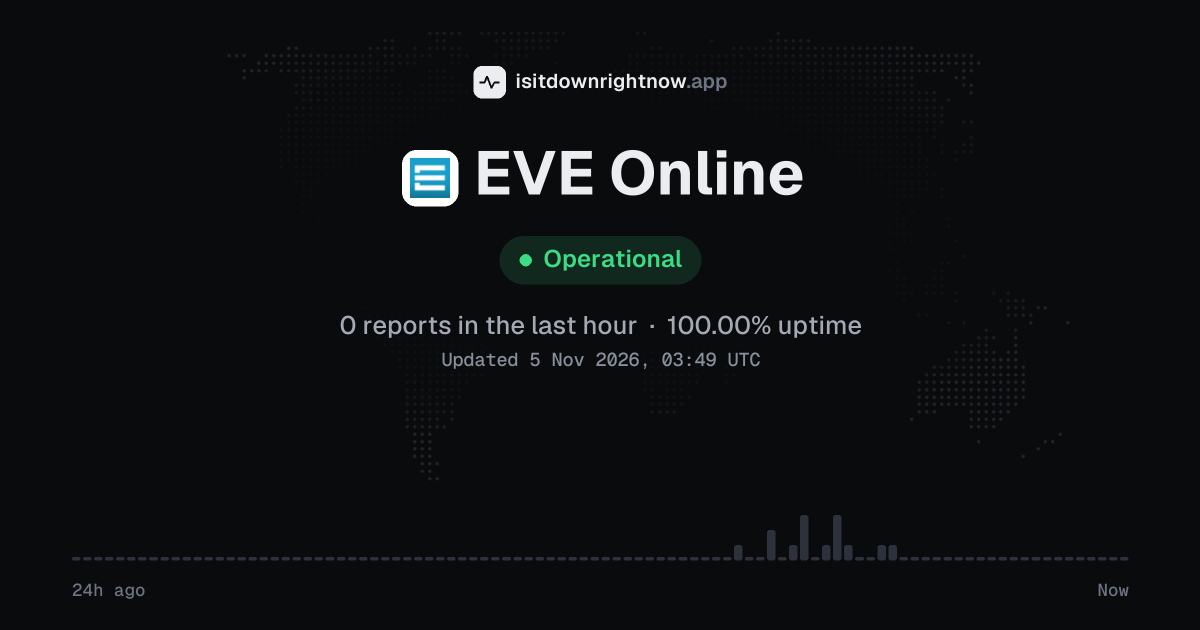
In the past 24 hours, 14 user reports came in for EVE Online. Counting only the 15-minute windows with a spike big enough to count as an outage, that comes to 100.00% uptime for the day.
The busiest 15-minute window had 3 reports, about 6 hours ago. That stays below our outage threshold, so it doesn't count as downtime.
EVE Online in November 2026
- Problem reports in November (since 4 November)
- 14
Monthly report for November 2026
People who report a problem with EVE Online to the outage-report feed behind this page can tag what is affected. These are the categories they can pick; the feed shows no counts per category:
- Login
- Purchases
- Server Connection
- Game Play
- Game Launch
- Lag / Latency
EVE Online problem spikes, last 30 days
Since 4 November, EVE Online had no outage spikes or periods of elevated reports.
A spike is a sharp rise in problem reports from users, kept exactly as this page showed it at the time. This history starts on 4 November 2026. Monthly reports for all services
How to fix EVE Online not working
EVE Online is up on our end, so if it won't work for you, the problem is most likely on your side. Work through these in order:
Your browser tries to reach eveonline.com over your own connection, right now. Nothing is sent to us or stored.
Restart the EVE Launcher
Close the game client first, then close the launcher. On Windows, press Ctrl+Shift+Esc, open Processes, select EVE Launcher, and click End task if it is still running.
Clear the EVE client cache
If you can reach the game, press Esc, open Reset Settings, and click Clear All Cache Files. Restart the client after the prompt, since this can fix stuck windows, blank market data, and character select problems.
Verify the shared cache
Open the EVE Launcher, click the gear icon in the top right, then go to Tools / Cache. Under Shared Cache, click Verify and let the launcher check the downloaded game files before you press Play again.
Reset DNS for Tranquility
On Windows, open Command Prompt as administrator and run: ipconfig /flushdns. If connection drops continue with messages like the socket was closed, run: netsh winsock reset, then restart the PC and your router.
Common EVE Online error messages
What each message means and what to try. The wording can differ a little between app versions.
-
The socket was closed
- Means
- The game client lost its connection to the EVE Online server.
- Fix
- Close the client and launcher, check your connection or VPN, then sign in again. If other players are being disconnected too, wait a bit and try again later.
While EVE Online is down: what to use instead
- Steam If the website or normal launcher will not load, Steam can start the installed client for accounts that use it, though it will not help during a server outage.
- EVE Portal The official mobile app can help you check character mail and skill training when the game client is the part giving you trouble.
- Elite Dangerous Use it if you want spaceflight, trading, exploration, and ship combat while you wait.
- Albion Online Pick this if the market, guild politics, and territory fights matter more to you than flying spaceships.
What happens when EVE Online goes down
EVE Online is a space MMO from CCP Games for Windows and macOS, built around one shared live universe with player corporations, markets, industry, and fleet fights. Pilots in the US and elsewhere can lose the launcher and character login, which also stops live battles and market orders.
The launcher is often the first place you notice trouble, because it may hang on sign-in or fail to start the client. If the game cluster has trouble, character selection can fail, jumps can leave you staring at a loading screen, chat can lag, or a socket closed message can kick the client back out. Full outages block everyone from the main live server, while partial incidents may leave logged-in characters online but stop new logins and launcher updates. Because the game uses a central live world, server outages tend to feel broad, although routing trouble can still make the problem look regional.
EVE Online IP address, servers and network
Checking eveonline.com from our server…
EVE Online FAQ
Is EVE Online down right now?
Why is the EVE Online launcher stuck checking the shared cache?
Why can I sign in to the launcher but not enter Tranquility?
What does 'The socket was closed' mean in the game client?
Why is my Omega time or PLEX purchase not showing in game?
Service updates from @EveOnline
No posts about problems from @EveOnline in the last 14 days. The latest is from .
Contact EVE Online support
Tip: EVE Online doesn't list a public status page that we know of, so its help centre and the report chart on this page are the best places to check.
Put the EVE Online status on your site
Paste one of these into a web page, a blog post or a README: a small badge, or a card with the chart. Both show the same status as this page, based on user problem reports, and link back here.

<a href="https://isitdownrightnow.app/services/eveonline/"><img src="https://isitdownrightnow.app/badge/eveonline.svg" alt="EVE Online status" height="20"></a>[](https://isitdownrightnow.app/services/eveonline/)A live card with the chart
The status, reports in the last hour and the last 24 hours, updated every 5 minutes. Use the frame, or the image where frames are not allowed, such as newsletters.
<iframe src="https://isitdownrightnow.app/embed/eveonline/" title="EVE Online status" width="100%" height="230" style="border:0;max-width:560px" loading="lazy"></iframe>
<p><a href="https://isitdownrightnow.app/services/eveonline/">EVE Online status</a> from IsItDownRightNow.app</p><a href="https://isitdownrightnow.app/services/eveonline/"><img src="https://isitdownrightnow.app/share/eveonline.png" alt="EVE Online status: problem reports over the last 24 hours" width="600" height="315" loading="lazy"></a>Badge, frame and image load no scripts from other sites and set no cookies; people who see them on your page load them from our server. More for journalists.
How we track EVE Online
The status on this page comes from user-submitted problem reports for EVE Online, counted in 15-minute windows over the last 24 hours. Each window is compared with the normal level for EVE Online, so a few complaints on a quiet day don't trigger anything, but a sudden jump well above normal does.
When reports climb well above normal, the status here changes to partial outage or major outage and the chart moves with it. EVE Online doesn't publish a public status page that we know of, so user reports are often the quickest sign that something is wrong on their side.